
In a previous post, I walk through the Yii framework’s built-in authentication system for adding login functionality to a Web site. There are a number of files and components involved, but simple authentication works fine out of the box, or with just a little tweaking. That’s the focus of that previous post. In this post, I explain how you can customize the authentication process further.The default authentication behavior allows users to login with hardcoded username/password combinations. In this post, I want to change that behavior so that:
- Authentication is performed against a database table
- The user’s email address is used instead of their username
- The user’s ID is stored for later reference
- The user’s “role” is stored for later reference
To start, let’s assume there is a database table called User that’s already been modeled and populated. The table has several columns, including at least: id, email, password, and role. The password column stores a SHA1()-encrypted version of the user’s password. The role dictates what the user can do in the site. Possible values are reader, editor, and writer (these are hypothetical values; they could be anything).
Now, by default, Yii will use cookies for authentication. In most situations that’s fine, but if anything of a sensitive nature is being stored, you should use sessions instead. This would apply to both the user’s ID value and their role. If either is available through a cookie, it wouldn’t be hard for the user to edit that cookie’s value in order to become someone else. So, to start, let’s disable the potential for using cookies. To do that, open up the protected/config/main.php configuration file and find this section from under components:
'user'=>array(
// enable cookie-based authentication
'allowAutoLogin'=>true,
),To disable cookie-based authentication, either remove that code entirely, or change allowAutoLogin to false.
Next, let’s turn to the login form, which will require a couple of alterations. Open up protected/views/site/login.php, which is the form. The default form looks like this:
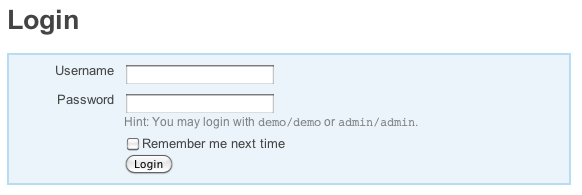
First, we need to remove the hint paragraph, as demo/demo and admin/admin will no longer work. Then we remove the code that displays the “remember me” checkbox. Remember me functionality is only good for cookies, so it’s useless here. Finally, we want to take an email address, not a username, so those two lines must be changed. The complete form file is now:
<?php $this->pageTitle=Yii::app()->name . ' - Login'; ?>
<h1>Login</h1>
<div>
<?php echo CHtml::beginForm(); ?>
<?php echo CHtml::errorSummary($form); ?>
<div>
<?php echo CHtml::activeLabel($form,'email'); ?>
<?php echo CHtml::activeTextField($form,'email') ?>
</div>
<div>
<?php echo CHtml::activeLabel($form,'password'); ?>
<?php echo CHtml::activePasswordField($form,'password') ?>
</div>
<div>
<?php echo CHtml::submitButton('Login'); ?>
</div>
<?php echo CHtml::endForm(); ?>
</div><!-- yiiForm -->Next, we turn to the LoginForm Model, defined in protected/models/LoginForm.php. This Model is associated with the login form, handling and validating that submitted data. At the top of the Model, the class variables are defined. We need to change $username to $email and remove $rememberMe:
class LoginForm extends CFormModel
{
public $email;
public $password;Next, alter the rules accordingly. Instead of username and password being required, email and password are required. Also, the email value should be in a valid email address format. The application of the authenticate() method to validate the password remains. Here are the updated rules:
public function rules()
{
return array(
array('email, password', 'required'),
array('email', 'email'),
array('password', 'authenticate'),
);
}Next, if you want, change the attributeLabels() method for the email address and remove the label for rememberMe:
public function attributeLabels()
{
return array('email'=>'Email Address');
}The final changes to the LoginForm Model are in the authenticate() method. Several references to username must be changed to email. For example, this:
$identity=new UserIdentity($this->username,$this->password);
becomes:
$identity=new UserIdentity($this->email,$this->password);
Then there’s a call to UserIdentity::authenticate(), which is where the actual authentication against the database takes place (see my previous post and I’ll also return to this shortly). After that, there’s an important switch conditional that responds to three possibilities: authenticated, invalid username, and invalid password. The applicable case is signaled by a UserIdentity constant. Do note that the UserIdentity class is an extension of CUserIdentity, so it uses ERROR_USERNAME_INVALID instead of ERROR_EMAIL_INVALID. In the following code I treat username and email address as synonymous, because it’s the easiest solution. A full alteration would require changing the Yii framework’s definition of CBaseUserIdentity (which CUserIdentity extends), which is not a good idea. So here’s the modified switch:
switch($identity->errorCode)
{
case UserIdentity::ERROR_NONE:
Yii::app()->user->login($identity);
break;
case UserIdentity::ERROR_USERNAME_INVALID:
$this->addError('email','Email address is incorrect.');
break;
default: // UserIdentity::ERROR_PASSWORD_INVALID
$this->addError('password','Password is incorrect.');
break;
}In the first case, with no error present, the user is logged in. I’ve removed references to rememberMe and duration, both of which are present in the Yii-generated code. The second case applies if the email address was not found in the database. Again, the error code is ERROR_USERNAME_INVALID, but it applies just the same. We do want to change the error so that it applies to the email element and has the proper error message. The final case applies if the email address was found but the supplied password was incorrect. Here’s an image for how the login form looks and behaves after these modifications:
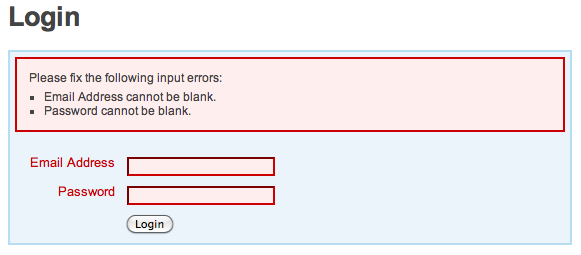
Finally, we turn to protected/components/UserIdentity.php, for the final changes. There are a couple of things we need to do in this file. First, we need to perform the authentication against the User Model (and therefore, the database). Second, we need to store the user’s ID and role in the session for later use in the site. For the authentication, we’ll modify the authenticate() method:
public function authenticate()
{
$user = User::model()->findByAttributes(array('email'=>$this->username));Now the $user object represents the User record with an email field equal to the submitted email address. You may be wondering why I refer to $this->username here. That’s because the CUserIdentity class’s constructor takes the provided email address and password (from LoginForm) and stores them in $this->username and $this->password. So I need to equate username with email here, which is better than editing the framework itself. You ought to leave a comment about this so that you won’t be confused later when looking at the code.
Next the authenticate() method checks a series of possiblities and assigns constant values to the errorCode variable:
if ($user===null) { // No user found!
$this->errorCode=self::ERROR_USERNAME_INVALID;
} else if ($user->password !== SHA1($this->password) ) { // Invalid password!
$this->errorCode=self::ERROR_PASSWORD_INVALID;In the first conditional, if $user has no value, then no records were found, so the email address was incorrect. In the second conditional, the stored password is compared against the SHA1() version of the submitted password. This assumes the record’s password was stored in a SHA1()-encrypted format. If neither of these conditionals are true, then everything is okay:
} else { // Okay!
$this->errorCode=self::ERROR_NONE;
// Store the role in a session:
$this->setState('role', $user->role);
}As you can see, a constant representing no error is assigned to the error code. After that, the user’s role value, from the database table, is stored in the session. This is accomplished by invoking the setState() method. Provide it with a name, role, and a value. After you’ve done this, the user’s role will be available through Yii::app()->user->role. You could do the same thing to store the user’s ID in the session, but the built-in authentication already has a getId() method that returns the user’s identifier. By default, the method returns the username value, so you’ll need to override the default behavior to return the ID instead. Start by creating a private variable in UserIdentity:
class UserIdentity extends CUserIdentity
{
// Need to store the user's ID:
private $_id;Then, in the else clause (for successful authentication), assign the user’s ID to the class ID variable:
$this->_id = $user->id;
Finally, after the authenticate() method, override the getId() method by redefining it as:
public function getId()
{
return $this->_id;
}
Now the user’s ID will be available through Yii::app()->user->id.
And that should be it. You now have an authentication process based upon an email address and password combination, using a database table, that also stores two pieces of information in the session. As always, thanks for reading and let me know if you have any questions or comments. Thanks, Larry!
Edit: Per a request, here’s the database schema, the LoginForm.php Model file, and the components/UserIdentity.php script that I *think* I used for this post:
CREATE TABLE `User` (
`id` int(10) unsigned NOT NULL AUTO_INCREMENT,
`email` varchar(80) NOT NULL,
`pass` char(40) NOT NULL,
`role` enum('reader','editor','writer') NOT NULL,
PRIMARY KEY (`id`)
);


You can also use the User model instead of a separate LoginForm model. This is what I did, but I don’t think it was a good choice. It didn’t help hardly anything, but bloated the User model. It did help reduce a small amount of redundancy though..
Thanks for your comments. Yes, you could use the User Model for login. However, the argument against doing so is that User represents and validates a lot more information than is used for just logging in. So User isn’t really a good representation of the login data.
An in time post. I am new to Yii(actually to the PHP frameworks) and was confused about how to begin. So, thought of a real world application which I need to do in a month’s time as a good model to experiment with. I have been using your YIi INto series and Yii cookbook to solve problems, when I hit upon the role-based User authentication. And here you are
Thanks a lot
PS:I haven’t yet read the post yet and am about to read now
Thanks for the feedback. I’m glad that the posts are useful for you.
So, now have read it and am now stuck at the authorization part
. Anyway, will be hoping you will do the authorization post soon 
Couple of unrelated things, I have noticed
1. One of the tags for this post is ‘yi’ instead of ‘yii’
2.For some weird reason, even if there are 3 comments, your blog post shows it as 2 comments.
Thanks for the feedback. I’ll discuss authorization in a post this week, although much of the topic is already in my Controller post. Thanks for pointing out the bugs, too!
Larry, thanks for your article, it’s really good!
I have one question though, what if I store the user roles in a separate table (UserRoles)? How this line “$this->setState(‘role’, $user->role);” would look like in my case?
Thank you!
Alex.
Thanks for the nice words. I’m a little skeptical about the idea of storing the actual roles in a separate table. Not sure why that’d be necessary. And, regardless, you’d still need to reflect the user’s role in the Users table somehow. Anyway, assuming the two tables are related, you would define a relation between the two in both Models, then could selected the related table record as well when you retrieve the user information. See my post on Models for more.
Thanks for you suggestion! I want to store the roles in a separate table, because one user can possibly (in my case) have more than one role (usually 3 or 4 roles), which makes it difficult to store them in the User table.
You’re quite welcome. I would still consider using singular roles that have increasing powers, like reader, writer (who can also read), editor (who can also read and write), and publisher (who can also read, write, and edit). Or, if that won’t work for some reason, you could consider doing a bitwise operation. Say there are 5 roles, you could then assign each person a 5-digit number, each number being a 0 or 1. Or, if you just want to use your separate table, then do as I suggested before where you identify the relationship so that you can retrieve the roles when you load the user.
Thanks for the nice tutorial! I am learning yii and somehow got stuck with authentication. I want every page on the site to require user to log in. Now I have the login form working at http://server/site/login, but I still can access http://server/index.php directly. How can I fix it?
You’re quite welcome. Thanks for the nice words. To do what you want here, you’ll need to change the SiteController, which controls the index.php page, so that its access permissions are appropriate.
>it’s access permissions are appropriate
Could you please elaborate? One of the approaches I found in the Yii CookBook (http://www.yiiframework.com/doc/cookbook/43/) is to check if(Yii::app()->user->isGuest) on every page I want to restrict access to. So in case of index.php I would need to modufy SiteController, in case of other pages – other controllers. Is that right? Or is there some more universal way to do it?
Yep, that’s correct. Each page is accessed through a Controller. For your situation, in every Controller you establish that if a user is a guest, they cannot access any of the actions therein. Except, of course, for the Controller that provides access to the login and logout actions. Everyone needs to be able to access those!
Hi Larry! Thanks for your great articles on Yii. I followed your tutorial on custom authentication twice now, but I get an error when I try to access site/login:
Fatal error: Call to a member function getErrors() on a non-object in D:\yii\framework\web\helpers\CHtml.php on line 1055.
Thanks in advance and have a nice day
Oh I’m sorry.. I had to change the last line of function actionLogin() in SiteController.php. It has to be “$this->render(‘login’,array(‘form’=>$model));” and not “$this->render(‘login’,array(‘model’=>$model));”.
Best regards!
Glad you got it figured out and thanks for letting me know. Thanks, too, for the nice words on the posts.
Hello,
Thanks for your articles, your are a foundation for the community
To force the login you can use onBeginRequest in the config (config\main.php), like this :
onBeginRequest'=>create_function('$event',
'if(Yii::app()->user->isGuest && !in_array($_GET["r"],array( 'site/login', 'other/public/page')))
{
Yii::app()->user->loginRequired();
})'
This way you don’t need to put check in every pages…
Thanks for the nice words and for sharing. To explain this code to others, the onBeginRequest parameter is a “when the process starts, do this”. Then, I believe, you create a function on the fly that performs the action. The code of the function dictates when a user login is required. The specific code checks if the user is a guest and they’re not requesting the login page or whatever public page. You would just put whatever public requests are allowed within that array. Very sharp solution!
Awesome tutorial!!! We need more post like this one for Yii!!!! It helped me a lot!!!
Hugs from Venezuela!
Thank you very much. I’m glad to hear it was useful.
Thanks for your tutorials, they have been a lifesaver!
I have gone through both of your authentication tutorials and everything seems to be working, but I am getting a “Fatal error: Call to a member function getId() on a non-object in /var/www/yii/framework/web/auth/CWebUser.php on line 186″ error at the very end. Any words of wisdom?
It may have something to do with the fact that I have created an Admin model and am authenticating against that rather than the existing User model.
Thanks!
You’re welcome. Thanks for the nice words. As for your issue, you probably haven’t defined a getId() method in your UserIdentity class.
Sorry, I’m new to Yii so I am still getting the swing of things. But I have added the getId() function right after the authenticate() function in UserIdentity.php. Any other thoughts?
No need to apologize. Without seeing more code (and the comments to a blog aren’t a good place for that), this is hard to debug. I guess I’d ask if you have a need to create and use a getId() method anyway. If so, and you’re still having a problem, post a question in my support forum, along with all the applicable code.
Hi Chris — did you even find a solution to this? I’m getting the same error. Thanks.
ok but if I want a login form visible in every page?
I would create the login form as a widget that’s added to the layout page.
Thanks for your good tutorial. Any chance you could give the schema for the user table, and a full listing of the UserIdentity component? Thanks
You’re welcome. I added that info to the end of the post. Hope that’s what you wanted!
I can’t thank you enough for your expeditious reply. However, I’m looking for the UserIdentity.php file, ‘protected/components/UserIdentity.php’. I’m getting a blank screen. Probably my fault, I suspect, because I’m not redirecting it to anything. Thanks, again for your generous and enlightening response to a neophyte.
You’re quite welcome. I’ve added that script to the post.
Back again. I keep getting the message “Property “User.password” is not defined.” upon attempting to log in. Sorry to be a pest. You’ve been a lot of help here.
No problem. I assume you don’t have a “password” column in your user table in the database?
Thanks for getting back so quickly. I figured that was the problem and corrected it. But now it won’t take the password I put in the database. I even put in a sha1 encrypted value. At a loss of what to do now.
Well, your Model dictates how passwords are handled. They’re probably stored in MD5 format.
I’m getting an error message “LoginForm does not have a method named “login”.” Thanks for any attention you give me here.
The answer depends upon what line of code is causing that error.
I’ve got the same error until I chanhed model LoginForm.php:
‘Email’,
//’rememberMe’=>’Remember me next time’,
);
}
public function authenticate($attribute,$params)
{
$this->_identity=new UserIdentity($this->email,$this->password);
if(!$this->_identity->authenticate())
$this->addError(‘password’,'Incorrect username or password.’);
}
public function login()
{
if($this->_identity===null)
{
$this->_identity=new UserIdentity($this->email,$this->password);
$this->_identity->authenticate();
}
if($this->_identity->errorCode===UserIdentity::ERROR_NONE)
{
$duration=$this->rememberMe ? 3600*24*30 : 0; // 30 days
Yii::app()->user->login($this->_identity,$duration);
return true;
}
else
return false;
}
}
Ooopps… paresere ate beginning of php code…. here code of Loginform:
class LoginForm extends CFormModel
{
public $email;
public $password;
public $rememberMe;
private $_identity;
public function rules()
{
return array(
array(‘email, password’, ‘required’),
array(‘email’, ‘email’),
array(‘password’, ‘authenticate’),
);
}
public function attributeLabels()
{
return array(
‘email’=>’Email’,
);
}
public function authenticate($attribute,$params)
{
$this->_identity=new UserIdentity($this->email,$this->password);
if(!$this->_identity->authenticate())
$this->addError(‘password’,'Incorrect username or password.’);
}
public function login()
{
if($this->_identity===null)
{
$this->_identity=new UserIdentity($this->email,$this->password);
$this->_identity->authenticate();
}
if($this->_identity->errorCode===UserIdentity::ERROR_NONE)
{
$duration=$this->rememberMe ? 3600*24*30 : 0; // 30 days
Yii::app()->user->login($this->_identity,$duration);
return true;
}
else
return false;
}
}
Hi,
Does the schema is storing password as plain text or md5 ?. For any production app, Storing the pass as plain text is a bad idea. Does Yii take care of it by itself. If not how can i manage it ?
Thanks
Thanks for your question. The UserIdentity.php component, used with logging in, is written to compare submitted passwords with a SHA1() version. In general, though, you can write encryption into your Models and Controllers as appropriate.
Hi,
User Model represent the current user of the application.
And inside model there are username and password.
How could I implement different kinds of user (sometimes login information are appropriated for some of us [just username&passwd] for others extra information are required.
For instance I have Admin, User1 who have both same login informations and User2 who have extra information.
Shall I keep User Model for Admin and User1 and make another model for User3 ?
Thanks
Thanks for the question and sorry for the delayed reply. From a database design perspective, if you have two things that are significantly different, you would represent them in different tables and therefore your MVC would represent them using different Models. I’m not exactly clear what your situation is, but that’s my hunch for you here.
As an example, I created a site with a bunch of users, not all of whom could log in. But the data stored for all of the users was exactly the same except for the presence of a password or not. So this made sense to use one Model. But if I had one type of user that had, say, 10 pieces of information stored, and another type of user that had only 2, then I’d use two Models.
Thanks,
with Yii architecture I wonder if we must use a User table which gathers login informations.
1. Am I right or not ?
2. In case we have different kind of user with different login information what are we supposed to do ?
Having always User table which factorizes common login informations bewteen users and others tables for specific info (one per kind of user?)
3. In Yii documentation (definitive guide) it was said that Use is used for retreiving persistent data about the user. In my mind, then, I understand that User may contain other information than login ones.
I’m a bit lost with Yii concerning this area
Larry do you have informations / hints ?
Thanks for your questions and my apologies for the delayed reply. Answers…
1. You don’t need to have a User table. You can allow for logging in without it (in fact, that’s the default way the auto-generated Yii app works).
2. Not exactly sure what you mean by “different login information”.
3. In the Yii documentation, “user” is used to retrieve persistent data about the current user. That’s a lowercase “user” and is accessible through Yii::app()->user. This is a different thing and is separate from any User Model or table. That’s a reference to the person currently accessing the site, whether or not they’ve been identified through an actual login process.
Hope that helps!
hi, again. I finally got the script to work. I put a sha1() generated value in the user table. Then logged in with the non-sha1() value. Contrary to the comment above, I left the actionLogin function in the SiteController alone:
// display the login form
$this->render(‘login’,array(‘form’=>$form));
Hope this helps someone else. Thanks again for your tutorial, again.
Kudos for figuring it out and thanks for sharing your solution.
Hello Larry,
I just wanted to say thank you for your help. I’ve been trying to get my head around Yii for a little while now. I kept giving up and going back to CodeIgniter. As nice as Ci is… I’m a “closet OOP purist”. So after doing something in CI for a while, I curse silently and head back to try my hand at Yii again. Because I have a serious project to work on now I decided that I had to “get” Yii and your blog entries have been extremely helpful. They were a catalyst that have allowed me to better understand the API and guide.
So once again, thank you.
You’re quite welcome and thanks for your comments. Just out of curiosity, could you explain a bit more about your issues with CI? I’ve heard good things about it, so I’m curious as to the ways in which you prefer Yii over CI. Good luck with your project!
hey , thanks for the post , it is very helpful
,,
, thanks
but i have a few questions regarding that , i want to make links for my pages in the index page , and i also want my index page as secured one , i mean no one can enter the index page without login , is there a post or some tutorial for that .
advice please
My Forcing Login for All Pages in Yii post should do the trick.
i am new to this Yii, I followed this guide and are presenting this error:
Description
Property “LoginForm.login” is not defined
Source File
C: \ xampp \ Yii \ framework \ base \ CComponent.php (264)
the line is:
if (class_exists (‘closure’, false) & & $ this-> $ name instanceof Closure)
If anyone knows the answer to this error and I can explain how to fix it would greatly appreciate
Hi Larry. Thank you for posting all these wonderful tutorials. They helped me get started with Yii so fast it’s amazingly fun.
A little question, I’m trying to implement an active directory authentication. And from your previous example, it would be so easy to return ERROR_NONE upon successfully bind. However, will it be possible to return an addition information? Or set a variable I can use in the models?
What I’m trying to do is to search the user’s memberof attribute to determine what group/role the user should have. I can think of a way to do it separately from the auth() but that would mean I have to initiate another ldap_bind. If possible I want to do ldap_bind just once.
Thank you.
You’re quite welcome, although a lot of credit goes to Yii for being so easy to use. As for your question, if I understand you correctly, you could retrieve the user’s role when you perform the login query and store it in a session variable for later reference.
I don’t quite understand how session works in Yii. Are they variables that stays as long as the browser is still openned? Is it better to store the session in database? Are there any tutorials you can point me to?
Thank you!
Yeah, sessions in Yii aren’t obvious. I’ll try to write up something on that subject. In the meantime, I don’t know of any tutorials about sessions in Yii, but a search online should turn up something.
Larry, do you have any wisdom to share on how one might set up sets of authorizations in Yii? For example, I’m configuring an app that instantiates a directory of resource info to different locations. I need to give users from each location particular sets of rights, and I need to be able to allow a user to have differing rights in different locations.
What would be the most elegant way to do this?
Many thanks,
Bill
Hello Larry,
Thanks for ur tutorials. am at the stage of beginners in web development so my difficulty may seems very easy for you. problem is, after login i want to set access to perticular person depending upon role set in User model. means if login person is admin den he can do complete CRUD operation or if login person is user den he only can do is CRU and nt delete. as i already said am at beginners level. Kindly reply.
Thank you,
Sangam Angre
See my post on Basic Controller Edits.
Hello Larry, i need login with email, username and password.
you know how do it?
i’m trying without results , don’t find how working with three parameters.
thank you for you help!
I do know how to do it, presumably. If you need help, please use my forums or the Yii forums.
Hi,
I have been following your tutorial. There is one problem i am facing. The password field is not being authenticated. I am also using MD5 encryption in password authetication. I am also following book Agile Web Application Development with Yii. Tried both the methods. I then comment out the swtiches in LoginForm.php file so that passwords and login always get authenticated. But still that doesn’t redirect the page.
I am confused.
If you need help fixing this problem, I would recommend using the Yii support forums.
I am getting this error
Table “User” does not have a column named “username”.
Yeah…that error pretty much means what it says: your users table doesn’t have a column named username.
well i tried to implement the role in my app but it didn’t work i don’t know why , i put the role attribute in my table then admin as a value in it . and i implemented the role in my authorization function and when i do echo Yii::app()->user->role. i got the result i need but still the admin cant performance his right like manage . did i miss something?
Hi Larry, i created a fresh webapp with the yiic command, generated a model called User and a controller called User which also generated user files in Views.. then I downloaded the LoginForm.php Useridentiy.php files and simply replaced them with the original files in the webapp. I modified /views/site/pages/login.php and deleted the unwanted rows for remember me and username, i created a database and used the table schema you edited above and made sure my config/main.php file is configured correctly to connect to that database, so now i try to login with a user i had created earlier and I keep getting an incorrect password message, when i can clearly see the emai/password for the user i created in the database, is there something i was missing?
thanks in advance.
Uh, maybe. But the comments section to a blog posting aren’t really a good place for debugging. Please use either my support forums or the Yii support forums.
Thanks, Larry!
I extended class CUserIdentity:
class MyCUserIdentity extends CBaseUserIdentity {
protected $id;
protected $name;
protected $email;
protected $password;
public function __construct($email, $password) {
$this->email = $email;
$this->password = $password;
}
public function authenticate() {
throw new CException(Yii::t(‘yii’,'{class}::authenticate() must be implemented.’,array(‘{class}’=>get_class($this))));
}
public function getId() {
return $this->id;
}
public function getName() {
return $this->name;
}
}
Then used it for UserIdentity class (class UserIdentity extends MyCUserIdentity) with email property. It is more convenient
Thanks for sharing!
Thanks for sharing!
Hi Larry,
do you have any idea how to set the authentication for only one user allowed being login.
for example if user 1 already login and then user 2 login again with the same username n password
the first user 1 will be logout.
thx
Interesting question. My inclination would be to store the session ID in the database. When user 1 logs in, you store the session ID there. When user 2 logs in, if there’s a session in the database, you’d add something to user 1′s session to indicate a forced logout, then update the database for the new user’s session.
Larry are you planning to write a book of Yii Framework? I love your series and would like to read a book of you.
I am, thanks for asking. I’m hoping to do that over the next few months. I’ll be posting a lot more about Yii here, too. Thanks, too, for the nice words!
In the third paragraph is says “let’s assume there is a database table called User that’s already been modeled and populated”
Can someone tell me how I can model the table I creaated
I have already set up:
‘db’=>array(
‘connectionString’ => ‘mysql:host=localhost;dbname=my_db’
in the config\main.php and have my table in my_db.
Thank you
That’s your database connection information, not the Model.
Yes, see my intro to Yii series.
I’ve been looking at a number of the rbac modules available for Yii – your very simple method is all that is needed in most cases with Yii::app()->user->role;
I didn’t quite follow the section: switch($identity->errorCode). I left this out and it still all works just fine, perhaps you can clarify this?
Thanks for your very useful articles!
Thanks for the nice words. As for that switch, the authenticate() method will return a response/status code in $identity->errorCode. You’d want to use this to know what to do: treat the user as logged in or display an error. Specific values will reflect specific authentication errors.